Generate BLE Advertisements with an arbitrary payload.
Note: to control if it works, you must be able to capture BLE advertisements in first place
nRF Connect for Mobile on Android
With nRF Connect for Mobile you can generate BLE Advertisements, but with a major limitation : your source MAC address is locally generated and will randomly change each time you restart advertisement. If your BLE application is MAC address based, you’re doomed.
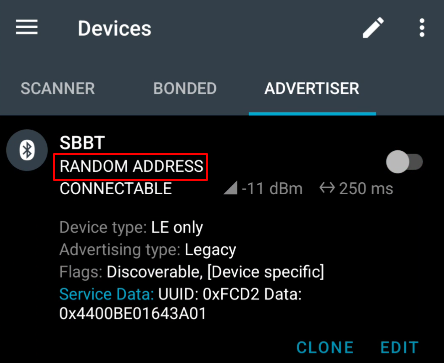
bluez on Linux
I couldn’t get it working following this guide on Kali Linux with a 8087:0029 Intel Corp. AX200 Bluetooth Bluetooth adapter.
DIY advertiser with seeed studio XIAO-nRF52840-Plus
Getting the opportunity to purchase a dirt-cheap seeed studio XIAO-nRF52840-Plus was the perfect occasion to step-in the Arduino ecosystem and revive my embedded systems development skills I haven’t used since I left engineering school 15 years ago.
Usage is pretty simple : provide the desired payload as hexstring over the serial console and it will be advertised.
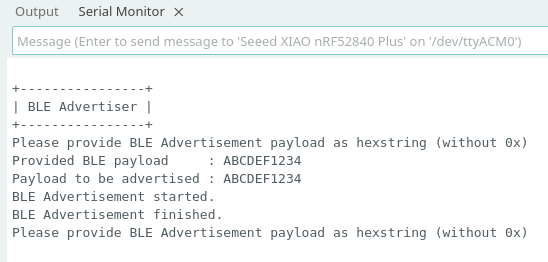
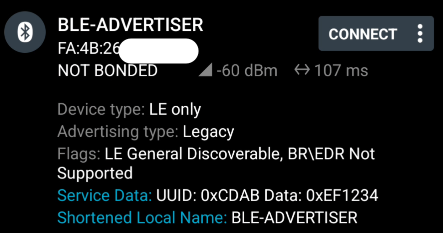
Arduino toolchain setup
Download the Arduino IDE Linux AppImage and follow the getting started guide.
Caveat : The required adafruit-nrfutil executable is only available through PyPi and you’re headed to break youre Linux system if installed globally. In this case you must install it in a virtualenv and start Arduino IDE from there.
# Make XIAO-nRF52840-Plus toolchain work on Debian-based Linux distros

# The toolchain will call python executable
apt install python-is-python3

# Bootstrap the virtualenv once
python3 -m venv ~/venv
source ~/venv/bin/activate
pip3 install adafruit-nrfutil

# Start Arduino IDE from the venv and you should be good to go
./arduino-ide_2.3.8_Linux_64bit.AppImage
Advertiser Arduino CPP source code
The Bluetooth library loaded with the XIAO-nRF52840-Plus board data in Arduino IDE seems to be an old version of Adafruit Feather nRF52 Bluefruit Libraries.
Put CPP code below into your ino sketch and start advertising arbitrary payloads.
/*********************************************************************
Advertise arbitrary BLE payloads with a Seeed Xiao nRF52840 Plus board
**********************************************************************/

#include <bluefruit.h>

#define BLE_SHORTENED_LOCAL_NAME 0x08
#define BLE_SERVICE_DATA 0x16
#define BLE_FLAGS_VALUE 0x06

#define BAUDRATE 115200

// Time to wait after last entered char if ENTER is not pressed
// 10 seconds seems fair
#define SERIAL_DATA_TIMEOUT_MS 10000

// Each payload is advertised during 1 second
#define ADV_SECONDS 1

// Legacy BLE Advertisement can contain 31 bytes of data
// Each byte is encoded in with 2 ASCII chars
// C strings are old-school and do end with \0
#define ADV_STR_BUFFER_SIZE 65 // 31*2 + 1

// Load a buffer from a hex string
char gStrBuffer[ADV_STR_BUFFER_SIZE];

// ADV_STR_BUFFER_SIZE could be odd. Ensure large enough buffer size.
uint8_t gPayloadBuffer[(ADV_STR_BUFFER_SIZE/2)+(ADV_STR_BUFFER_SIZE%2)];

// Do not notify the /0 as it will break data that follows
char shortenedLocalName[] = "BLE-ADVERTISER\0";

// Advertise provided payload.
// Always do a clean start otherwise it just stops advertising data after some time.
void advertisePayload(uint8_t *payload, uint8_t payload_size) {
  bool startStatus = false;

  // Advertisement setup
  Bluefruit.Advertising.clearData();
  Bluefruit.Advertising.addFlags(BLE_FLAGS_VALUE);
  Bluefruit.Advertising.restartOnDisconnect(true);
  Bluefruit.Advertising.setInterval(160, 160);    // in unit of 0.625 ms
  Bluefruit.Advertising.setFastTimeout(30);      // number of seconds in fast mode
  Bluefruit.Advertising.addData(BLE_SERVICE_DATA, payload, payload_size);

  // Advertise and wait
  startStatus = Bluefruit.Advertising.start(ADV_SECONDS);

  if (!startStatus) {
    // BUG: if payload size changes between two advertisements, we end here.
    Serial.printf("ERROR: Bluefruit.Advertising.start() returned false. Payload size was %i.\r\n", payload_size);
  } else {
    Serial.printf("BLE Advertisement of %i bytes started for %i seconds.\r\n", payload_size, ADV_SECONDS);
    delay(ADV_SECONDS*1000+100); // Wait an extra 100ms just in case
    Bluefruit.Advertising.stop();
    Serial.printf("BLE Advertisement of %i bytes finished.\r\n", payload_size);
  }

}

// Converts an hex string into a byte array.
void hex2bytes(char *str_buffer, uint8_t *payload_buffer) {
    // Actual hex string length
    uint8_t str_buffer_len = strlen(str_buffer);
    // Byte currently beeing constructed and then added to payload_buffer
    uint8_t current_byte = 0;
    // Current char being read from str_buffer
    char current_char = 0;
    // Current value beeing read from current_char
    uint8_t current_val = 0;

    if (str_buffer_len % 2 != 0) {
        Serial.printf("Hexstrings must have an even number of chars and you provided %i. The last one will be ignored. Too bad !\r\n", str_buffer_len);
    }

    for (int i=0; i<str_buffer_len; i++) {
        // Read current char value
        current_char = str_buffer[i];

        // Each 2 chars is a new byte
        if (i % 2 == 0) current_byte = 0;

        // Transform hex character to the 4bit equivalent number, using the ascii table indexes
        // Credits for this code go to https://stackoverflow.com/a/39052987
        if (current_char >= '0' && current_char <= '9') current_val = (uint8_t) current_char - '0';
        else if (current_char >= 'a' && current_char <='f') current_val = (uint8_t) current_char - 'a' + 10;
        else if (current_char >= 'A' && current_char <='F') current_val = (uint8_t) current_char - 'A' + 10;
        else {
            Serial.printf("'%c' is not a valid hex char and will be replaced with 0.\r\n", current_char);
            current_val = 0; // just ignore invalid chars
        }

        // First char is the 4 most significant bits
        if (i % 2 == 0) current_val = current_val << 4;
        current_byte += current_val;

        // Write byte to payload buffer when second char is processed
        // Note: last hex char will never be written if char count is odd (implicitely ignored)
        if (i % 2 == 1) payload_buffer[i/2] = current_byte;
    }


    // Display the translated buffer
    Serial.print("Payload to be advertised : ");
    for (int i=0; i<str_buffer_len/2; i++) {
        Serial.printf("%02X", payload_buffer[i]);
    }
    Serial.print("\r\n");

}

void setup()
{
  // Initialize Serial console
  Serial.begin(BAUDRATE);
  while (!Serial);
  Serial.setTimeout(SERIAL_DATA_TIMEOUT_MS);
  Serial.println("");
  Serial.println("+----------------+");
  Serial.println("| BLE Advertiser |");
  Serial.println("+----------------+");
  Serial.println("BUG: Restart device when payload size changes, otherwise advertisement will not start.");

  // Initialize the BLE stack
  Bluefruit.begin();
  Bluefruit.autoConnLed(true); // Blue LED
  Bluefruit.setTxPower(0);    // Check bluefruit.h for supported values
  Bluefruit.ScanResponse.addData(BLE_SHORTENED_LOCAL_NAME, &shortenedLocalName, sizeof(shortenedLocalName));
}

void loop()
{
  Serial.println("");
  Serial.println("Enter BLE Advertisement payload hexstring (without 0x) and hit Enter (\\r).");

  // Indefinite wait on serial data. We can't continue without hex payload.
  while (!Serial.available()) delay(10);

  int bytesRead = Serial.readBytesUntil('\r', gStrBuffer, sizeof(gStrBuffer) - 1);
  gStrBuffer[bytesRead] = '\0';  // Null-terminate the string
  Serial.print("Provided BLE payload     : ");
  Serial.println(gStrBuffer);

  // We must at least have UID (2 bytes) and 1 byte of data
  if (bytesRead < 6) {
    Serial.println("Payload too short. It will not be sent.");
  } else {
    // Convert the hexstring in bytes array
    hex2bytes(gStrBuffer, gPayloadBuffer);

    // Advertise the payload
    advertisePayload(gPayloadBuffer, strlen(gStrBuffer)/2);
  }

}